sfc.exe /SCANNOW
Archive for February, 2010
SFC.EXE (system file checker)
Thursday, February 25th, 2010How to restore Offline Files without Windows working
Friday, February 19th, 2010Use a working computer with the same version and service pack level of Windows XP.
Copy the %SYSTEMROOT%\CSC directory contents from the old hard drive to the same location on the working computer.
On the working machine, open a command prompt.
Type csccmd /enable
Create a target directory, for example C:\Restore
Type csccmd /extract /target:C:\Restore /recurse
Your files will be extracted from their compresses offline files format back to their original format!
TreeSize Free 2.3.3
Tuesday, February 9th, 2010Every hard disk is too small if you just wait long enough. TreeSize Free tells you where precious space has gone to. TreeSize Free can be started from the context menu of a folder or drive and shows you the size of this folder, including its subfolders. You can expand this folder in Explorer-like style and you will see the size of every subfolder. Scanning is done in a thread, so you can already see results while TreeSize Free is working. The space, which is wasted by the file system, can be displayed and the results can be printed in a report. TreeSize Free is freeware for Windows 2000/XP/Vista/7
How To Burn ISO Images on Windows Server 2008
Sunday, February 7th, 2010cdburn <drive> -erase [image [options]]
cdburn <drive> image [options]
Options:
-erase Erases the disk before burning (valid for R/W only)
-sao Writes the image out in “session at once”, or cue
sheet, mode (default is “track at once”)
-speed Speed of burn, or ‘max’ for maximum speed
-imagehaspostgap Use if your image already contains a 150 sector postgap
The [image] must be provided unless the -erase flag is set.
If both an image and -erase are provided, the media will be
erased prior to burning the image to the disc.
Sharing an ISO Image using Hyper-V and SCVMM R2
Saturday, February 6th, 20101.Ensure that Authenticated Users has READ permissions (Share & NTFS) on the SCVMM Library Share.
2.Go into Active Directory Users and Computers, right click on each of your Hyper-V Servers and select the Delegation tab
3.Select “Trust this computer for delegation to specified services only”
4.Select “Use any authentication protocol”
5.Click the “Add” button
6.Click the “Users and Computers” button
7.Type the name of your SCVMM server and click OK
8.Select “cifs” and click OK
9.Wait 20-30 minutes… why? because Active Directory must update
How to Disable Windows Media Center in Windows 7
Saturday, February 6th, 2010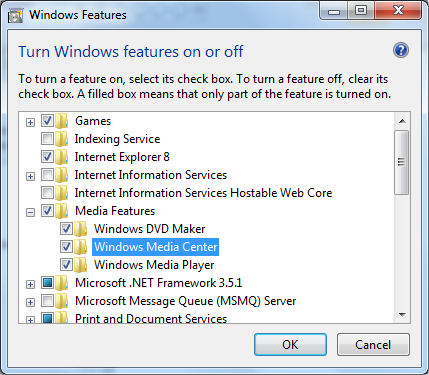
Windows Storage Server 2008 Default Password
Thursday, February 4th, 2010default password is “wSS2008!”
Multiple IP on a single network interface script
Wednesday, February 3rd, 2010netsh
interface ip
add address name=”LAN” addr=10.10.10.1 mask=255.255.255.0
add address name=”LAN” addr=10.10.10.2 mask=255.255.255.0
add address name=”LAN” addr=10.10.10.3 mask=255.255.255.0