NetTime – Network Time Synchronization Tool (timesynctool.com)
Archive for the ‘Ikke kategoriseret’ Category
NetTime is a Simple Network Time Protocol (SNTP)
Thursday, February 16th, 2023TreeSize Free Portable
Saturday, September 12th, 2020Fix L2TP and PPTP VPNs on Windows Vista/7/8/2008/R2/2012/2016/2019
Sunday, February 16th, 2020On your Windows Vista, 7 or 8 client machine change or add the following registry item:
HKEY_LOCAL_MACHINE\SYSTEM\CurrentControlSet\Services\PolicyAgent
New DWORD (32-bit) Value:
AssumeUDPEncapsulationContextOnSendRule
Set the value to 2
This allows the client or server to be behind a NAT firewall.
Reboot after making the change, and retry the connection.
Force Windows indexing to run faster
Saturday, January 26th, 2019Dummy File Creator
Friday, January 18th, 2013Disable EU Browser choice with Group Policy
Monday, March 15th, 2010How to remove with Group Policy :
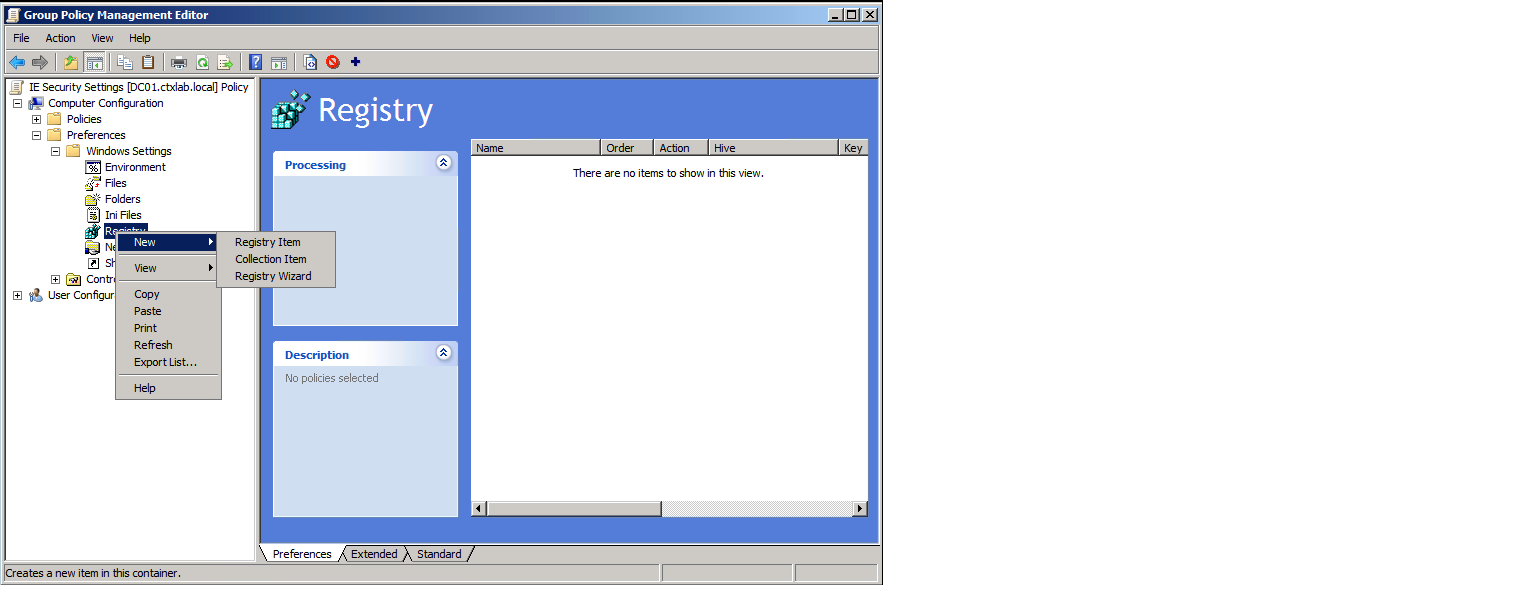
- Open Group Policy Management Console and edit or create a new Group Policy Object
- Navigate to Computer Configuration – Preferences – Windows Settings – Registry
- Right click Registry – New – Registry Item
- Type is as shown below
[HKEY_LOCAL_MACHINE\SOFTWARE\BrowserChoice]
“Enable”=dword:00000000